Wednesday, 13 March 2013

Actifio PAS: Protection and availability storage


Actifio PAS: Protection and availability storage

Last month I went to Hyderabad for the new product technical understanding and that product name is Actifio PAS and above I have already mentioned that what PAS stand for, as the training was wonderful and the technology too was very good.

I will be explaining about the Actifio technology and how it works and where this technology can be used and which section of market can be targeted.

Actifio—Who We Are

Actifio is radically simple copy data management.

Our Protection and Availability Storage (PAS) lets businesses recover anything instantly, for up to 90 percent less. PAS eliminates siloed data protection applications, virtualizing data management to deliver an application-centric, SLA-driven solution that decouples the management of data from storage, network and server infrastructure. Actifio has helped liberate IT organizations and service providers of all sizes from vendor lock-in and the management challenges associated with exploding data growth. (definition taken from Actifio site).


So In above figure you can easily see that how we keep on copying the same production data again and again in different form for different purpose, and that’s why we keep on buying different Hardware to store those copies and because of that our IT budget keep on increasing on storing the same copy of data.

Now you all will be thinking that there is lot of technology which removes the duplicate data to be stored again in the compliance, ya that’s right like today there is lot of buzz of deduplication technology in market and it really helps you to not copy the duplicate data again.

Just have a small look in deduplication technology, how its coming in market, for ex: either the backup software will be having this deduplication features so that you can easily save your disk space by not copying the duplicate data again and again.so this may be licensed feature again extra cost if you want to use this feature.

Or you buy a dedicate Hardware deduplication compliance like EMC Datadomain and Quantum DXI boxes for dedicate deduplication backup solution, these hardware are disk based inline deduplication solution which will integrate with you existing backup software and takes backup on their disk. So if you see again a new hardware and extra cost for storing the copy of production data to the new hardware device.

Or now days this duplication features are present in the NAS storage also, but they are not inline deduplcation and they start the deduplication service on timely basis and find the duplicate data and keeps pointer on it.., but not much successful because utilize lots of CPU resource and then lots of manual work is required like I seen in Netapp deduplication volumes that you need to unduep the deduplication volume, if you want to increase its size. And if you see these production storage (SAN &NAS) are not meant for these types of work, they are meant for fetching the data to the user or servers or application in greatest performance, that’s why they are brought to centrally store the data and should give good performance on fetching the data.

And if we see in many IT environment these production storage are doing lots of extra work because of these extra features like deduplication, snapshot, cloning, migration,replication and etc.., and because of all those process the performance of production storage box decreases drastically and then the IT admin or IT manager complaints that their production storage is not giving the better performance.

Now Actifio PAS has removed all those production storage burden from (SAN &  NAS) and came up with the backup compliance which will be not only doing the deduplication but also it has a features of migration, cloning, mounting ,snapshot, backup, restore with defined default SLAs and if user want then he can define its own SLAs, to protect its data.

In below figure you will see how the Actifio PAS came up with the new approach.


“Actifio virtualizes your copy data storage applications, consolidating them to enable you to recover anything instantly for up to 90% less.”

Actifio—A New Approach 

Actifio virtualizes your copy data storage applications, providing backup, snapshot, BC/DR, test & dev, analytics and disaster recovery all through a single storage system. This approach enables you to consolidate all those functions and recover anything instantly; this is why Actifio is Radically Simple. (definition taken from the Actifo site.)

Now as it is clearly understandable if you see the image that how the Actifio stores the data from the production storage to its compliance and then how it virtualize the copy to the different environment, and save your lots of time in copying or moving the data from one place to other.

Actifio’s PAS is a copy data management system that can be deployed either within the SAN Fabric or “out-of-band,” over the network. Both methods have their advantages and provide customer options when deploying the Actifio solution. The heart of the Actifio solution is the Virtual Data Pipeline (VDP) technology. Its function is to virtualize production data copy management, eliminating redundancies and re-purposing the unique data for multiple data management applications. VDP efficiently captures a single copy or “gold copy” of changed data from the server and reuses the data for multiple uses, allowing the applications to directly access to copy data from Actifio PAS without any data movement.

One of the good feature of Actifio is the discovery of the critical application on server and then its drive by just installing the Actifio connector , its an software which need to be installed on the server which need to be backedup, this software automatically discover the critical application and protect it by define SLA, and this connector comes free of cost and so if you see we no need to depend on the backup software to take the backup of the data, just install the connector and then you can easily backup its critical application as well the files on that server.

Even it easily discover the ESX servers and the vm which are hosted on that server, those vm can be viewed in a filesystem type view, in a proper structured way, so its easy to find out the which esx is hosting which vms and what all the application that vm have and the proper layout of its drive and files, so it becomes easy to take backup of single file in vm and easy to restore single file.

Several enterprise class applications and platforms provide advanced interfaces for better manageability of copy data. Examples include Microsoft Windows VSS and Oracle RMAN. Actifio PAS directly interfaces with these API’s to capture an application-consistent snapshot of the data and import only the changed blocks into Actifio PAS. This provides the most efficient level of data capture at the application level.

In addition to reducing the storage footprint by over 10X, Actifio PAS enables customers to use any storage device. Customers can now have their SLA’s dictate the type of storage they use, rather than be constrained by their storage vendor. Many users have re-purposed their existing storage for storing data copies or have opted for lower cost storage devices. This capability further lowers the overall storage costs by over 50%

Most of the production storage does not support the synchronous replication more than 100km, this 100 km of synchronous replication is supported by Hitachi HNAS solution it was mentioned on their white paper. But if you go through the white paper of Actifio it support the synchronous replication up to 300 km, which is unique.., and if you see known of the backup deduplication disk solution support the synchronous replication they all support the async replication and if you see Actifio which is your new generation backup device can sync your backup data upto 300km, so that you can achieve fastest recovery on the time of disaster.

Sync Replication: Synchronous replication can be guaranteed between customer sites   up to 300KM apart.

Now why I am telling about the replication of actifio is that to do synchronous replication in mostly required for the production storage, but for doing synchronous replication lots of cost comes into picture , buying the license and then doing the setup, and apart from that you will not get the distance of 300 km , so in Actifio the synchronous license is free you don’t have to pay additional cost and then you can easily do a synchronous setup of 300km .

Async Replication: Asyncronous replication has no distance limitation, and will send data over the WAN as fast as network bandwidth allows.

You no need to replace any of your device, like your SAN and NAS device it can easily integrate with your existing storage, now if I say integration means that you can easily give storage disk to Actifio PAS from your existing storage and that means if you have multiple vendor storage you can assign LUN from those storage via Actifio, and can easily give those luns to different servers.

The below given figure tells you about the product packages.


Where this solution can be fit in IT environment.


Now after all the solution discussion comes the management, as some time managing the good solution becomes very complex , but the Actifio desktop is the GUI interface by which you can manage the actifio compliance and define your SLA and do the replication and restore easily the backedup data and easily take backup of the critical data.., I will be showing of the “Actifio desktop view “ via some snap by which you can easily figure out that how the Actifio desktop looks and how easily you can manage the actifio compliance.

How to create a SLA
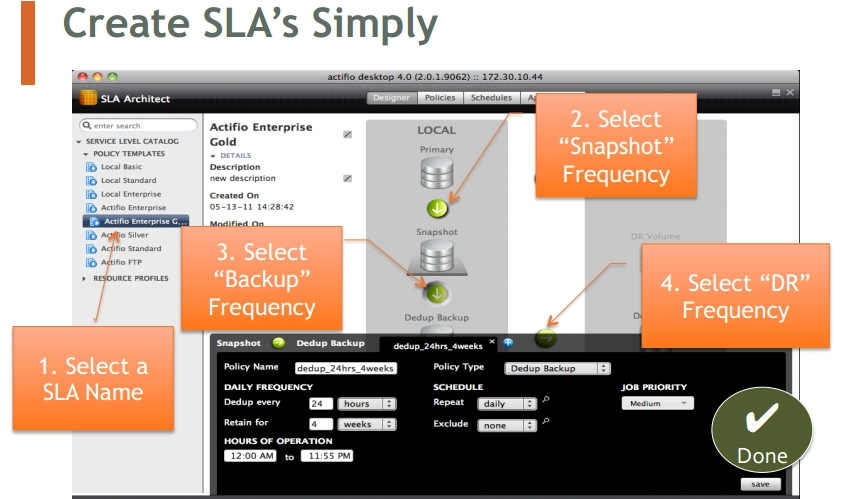


In the above figure you have seen that how easy it is to define your own SLA and then how easy to protect particular application on that define SLA and then how easy it is to restore the file and data, and how fast you can restore by not copying or moving the data back to the client or server but via mounting the data back to the server, or you can create a clone copy of the data and use it for your testing purpose.

The below given is the snap view of the management window in Actifio desktop which shows you that what all application are protected and what all are unprotected, you can see the system health the space view and the jobs history and hardware health and many more..


Now as I have already wrote enough about the Actifio which can easily help you out to understand about this product, if still you want to know more than you can visit to Actifio site www.actifio.com and can get more information about this product, or you can write to me on my email id.

I want to tell you that this product was tested by the ESG lab and they have given a good report about this product, you can download that report from the ESG site or from the actifio site and can have a proper and deep understanding of how good this product is and how easily it can save lots of your IT money, and how it can reduce you backup window and restore window.

Below is the conclusive report which the ESG lab has given about the Actifio.

The Bigger Truth 

Everyone is talking about the data explosion occurring in organizations around the globe. More data —and bigger data sets —are being created to drive business. What few realize, however, is that while production data is certainly growing, copies   of production data are growing exponentially. Copies are made for physical backup, virtual backup, snapshots, disaster recovery, business continuity, business analytics, compliance, and test/development. The cost of managing and retaining these copies is often many times higher than the cost to store the original data. In particular, storing and managing all of the copies using separate tools and duplicate infrastructures is a tremendous expense, and it consumes much of the database, application, server, and storage administrators’ time.

Actifio PAS separates what you do with your data copies from how you store them. Why should copies have to be created differently and managed separately just because they have different purposes, copy frequencies, retention times, and recovery needs?

Actifio PAS virtualizes the management of   all copies so they work for the customer instead of the other way around. Users make a single copy and use it for different purposes with different SLAs —dramatically reducing unnecessary data growth, reclaiming tire 1 storage space, and getting instant ba ckup and recovery. Along the way, they can get rid of backup software, point solutions, dedupe appliances, tape libraries, tapes, replication tools, and WAN optimization products. Offloading copying and copy management makes a production environment more efficient. Customers gain freedom of choice because any production storage can be attached to Actifio PAS appliances   to be used as the data protection store. In addition, that freedom makes offsite replication more affordable and ensures that future storage   decisions aren’t dictated by today’s needs.

Through validation testing, ESG Lab was able to confirm a 29 times (2900%) capacity reduction compared with the traditional copy management approach.  By leveraging deduplicated replication, we also observed a 97% reduction in the bandwidth required for replication.  ESG Lab expects real-world savings to be even greater than the testing results were, as field experience   has shown typical data to exhibit even better deduplication rates than the   test data   set. 

Actifio PAS represents a new class of storage designed to simplify and streamline the IT infrastructure, and the benefits are dramatic. Most organizations make between three and 20 copies of production data.  Some may have over one hundred copies.  That’s great news for storage vendors, but it is a huge capital and operational expense   for IT organizations.

Actifio PAS is an application-centric, SLA -driven solution that, through virtualization, decouples the management of data from storage, network, and server infrastructures. The efficiency improvements and cost reduction s will benefit not only corporate IT organizations, but also service providers that can leverage these features to differentiate their offerings, prices, and margins.  Although   Actifio PAS is new to the market, ESG expects it to significantly affect the bottom line of any corporate IT department or service provider, as well as enable   new   levels of protection for “big data” sets. We look forward to following Actifio PAS as it expands in its scope and capabilities.


If you all enjoyed my blog on Actifio or on any other which I wrote please do comment on it, your comment keep me motivated on writing lot more and sharing all my knowledge with you all. Do write suggestions if you all have any.

Friday, 11 January 2013

NETAPP_SNAPLOCK


NETAPP_SNAPLOCK

One day I was giving an technical interview, in which interviewer asked me a question, it was related to NetApp storage technology, and the question was that what is the “Compliance volume”, I got stuck and was not able to give any reply, because I was not aware of compliance volume, so after the interview got finished, I star searching for the compliance volume in NetApp and then I found that compliance volume is also know or called as snap lock volume.

I knew about snap lock volume in NetApp, but I did not know that the snap lock volume is also known as compliance volume.

After getting rejected in that interview, I thought of writing something about the snap lock volume, as the snap lock is not much used in most of the companies, so most of the NetApp administrator is not aware of this feature in NetApp and some who knows about this feature have not used it.

SnapLock is NetApp WORM (Write Once Read Many)

Some regulated environment require business records be archived on WORM media to maintain a non-erasable and nonrewritable electronic audit trail that can be used for discovery or investigation.

DataONTAP SnapLock software complies with the regulations of those markets. With SnapLock, the media is rewritable but the integrated hardware and software controlling access to the media prevents modification or deletion.

SnapLock is available in tow version: SnapLock compliance for strict regulatory environment, and SnapLock Enterprise, for more flexible environments.

SnapLock can integrates with the snap Mirror and snap vault, and snap mirror allows the SnapLock volumes to be replicated to another storage system and Lock vault backs up SnapLock volumes to a secondary storage system to ensure that if the original data is destroyed than the data can be restored or accessed from another location.

Once the data is created in the SnapLock volume they comes under the retention period and these files get treated as WORM, so that nobody can delete or modify the data until and unless it reach to its retention period, the SnapLock volumes cannot be deleted by the user, administrator nor by the application, the retention date on a WORM file is set when the file is committed to WORM state, but it can be extended at any time. The retention period can never be shortened for any WORM file.

SnapLock Compliance (SLC)

SnapLock Compliance is used in strictly regulated environment, where data is retained for longer period of time and these data are accessed frequently only for readable purpose.

SnapLock Compliance even does not allow the storage administrator’s to perform any operations that might modify the file, it uses the feature called “ComplianceClock” to enforce the retention periods. SnapLock Compliance requires the SnapLock license to enable the SnapLock features and to restrict the administration access to the file.

SnapLock Enterprise (SLE)

SnapLock Enterprise allows the administrator to destroy the SnapLock volume before all the file on the volume reach their expiration date. However no one else can delete or modify the files.

It requires the SnapLock _enterprise license

NOTE:

1.       From dataontap 7.1 and later, SnapLock compliance and SnapLock Enterprise can be installed on the same storage system.

2.       Uninstalling the SnapLock license does not undo the SnapLock volume or the Worm file properties. When uninstalling the license, existing SnapLock volumes are still accessible for general reading and writing, but won’t allow new files to be committed to WORM state on the SnapLock volume, or the creation of any new SnapLock volumes.

SnapLock Configuration Steps

1.       Verify that the storage systems time zone time and date are correct.

2.       License SnapLock.

3.       Initialize  the compliance clock

4.       Create SnapLock aggregate and volume.

5.       Set retention periods

6.       Create files in the SnapLock volume

7.       Commit files to a WORM stat.

Use the “date –c initialize” command to initialize the compliance clock.

After compliance clock is initialized, it cannot be altered and WORM files, SnapLock compliance volumes, or aggregates cannot be destroyed. As compliance volume get in sync mode with the system clock, so when the volumes is taken offline then the compliance volume will get out of sync with the system clock, but when the volumes is brought online back the data ontap will start to make up the time difference, the rate at which the compliance clock catches up depends on the version of data ontap your system is running.

Creating the snaplock volumes

Snaplock type, compliance or Enterprise, is determined by the installed license.


Creating the snap lock traditional volumes

“vol create –L vol_name <n_disk>”


For ex :

System> vol create viptrd –L 14


For creating the SnapLock flexible volumes, you need to create the snaplock aggregate first


“aggr create –L aggr_name <n_disks>”

“vol create vol_name aggr_name <size>”


For ex:

System> aggr create vipaggr –L 3

System> vol create vipflex  vipaggr 100m

System> vol status vipflex (for checking the status of the vipflex volume)


Volume Retention Periods.

The retention periods are the volume’s attributes. If you do not explicitly specify an expiration date for a WORM file, the file inherits the retention periods set at the volume level.


There are three retention periods per volume: a minimum, a maximum and a default.

1.       Until you explicitly reconfigure it, the maximum retention period for all WORM files in a snap Lock Compliance volume is 30 years.

2.       If you change the maximum retention period on a SnapLock Compliance volume, you also change the default retention period.

3.       If you change the minimum retention period on a SnapLock Enterprise volume you also change the default retention period. The minimum retention period is 0 years.

How to set the Retention Periods.

Use the vol options command to set the retention period values.

For ex:

System> vol options vol_name snaplock_minimum_period [{period} |min |max | infinite <count>d|m|y]

System>vol options vipvol snaplock_minimum_period 1d

System> vol options vipvol snaplock_default_period min

Min is the retention period specified by the snaplock_minimum_period option, max is the retention period specified by the snaplock_maximum_period option, infinite specifies that files committed to WORM state are retained forever.

For storage system using dataOntap 7.1 and later , the maximum retention period can be extended up to 70 years.

You can also extend the retention date for a WORM file before or after the file retention date has expired by updating its last accessed timestamp. This will re_enable WORM protection on the file as if it were being committed for the first time. Once the retention date expires, you can re_enable the write permission on the file and then delete it. However the file contents still cannot be modified.

Note: the SnapLock volume maximum retention period restrictions are not applied when extending the retention date of a WORM file.

Committing Data to WORM

After placing a file on a snaplock volume, the file attributes must be explicitly changed to read-only before it becomes a WORM file. These operations can be done interactively or programmatically, the exact command or program required depends on the file access protocol (CIFS, NFS, and so on) and client operating system being used.

Below command could be used to commit the document .txt file to a WORM state, with a retention date of November 21,2020 ,using a unix shell.

touch –a –t 202011210600 document.txt

chmod –w document.txt

For a windows client, to make a file read-only, right-click the file, select properties, checks the read only checkbox and then clicks OK.

The last accessed timestamp of the file at the time it is committed to WORM state becomes its retention date unless it is limited by the minimum or maximum retention period of the SnapLock volume. If the date was never set, the default retention period of the SnapLock volume is used.

If a file is initially copied read-only, it is not automatically committed to WORM state. The only way to guarantee that a file is committed to WORM state is explicitly assign a read-only attribute and optionally modify the last access time to set a retention date while the file is in the SnapLock volume.

Auto-Committing Files.

A time-delay commit to WORM with an adjustable timer is available in Data Ontap 7.2 or later. If the file does not change during the delay period, the file is committed to WORM at the end of the delay period. Auto-commit does not take place instantly when the delay period ends. Auto-commit are performed using a scanner and can take some time. The retention date on the committed file will be determined by the volume’s default retention period.

To specify a time delay, set the global option snaplock.autocommit_period to a value consisting of an integer count followed by an indicator of the time period: “h” for hours, “d” for days. “m” for months, or “y” for years.

System> options snaplock.autocommit_period none | [count (h | d | y)]

The default value is none and the minimum delay that can be specified is two hours.

The following example sets the auto-commit period to 24 days.

System> options snaplock.autocommit_period 24d

Appending WORM File

A WORM file can be appended by simple creating an empty Snaplock file, appending data to it, and then locking the file in place again, data is committed to WORM state in 256 Kb chunks; the previous 256 kb segment automatically becomes immutable. This procedure can be done from ontap7.1 onward.

For ex:

1.       Inside a WORM volume create a zero-length file with the desired retention date.

touch  -a  -t  202012150600 file


2.       Update the file access time to indicate the file’s desired expiration.


3.       Make the file read-only.

chmod 444 file


4.       Make the file writable again.

chmod 755 file


5.       Start writing data to the file.

echo test data > file


at this stage you have a WORM appendable file. Data is committed to WORM in 256 kb chunks. Once data is written to byte n*256K+1 of the file, the previous 256Kb segment is in a WORM state and cannot be rewritten.


6.       Make the file read-only again. The entire file is now in the WORM state and cannot be overwritten or erased.

chmod 444 file


Deleting WORM volumes and Aggregates


You cannot delete SnapLock compliance volumes that contain unexpired WORM data. You can delete the volume only when all the WORM files have passed their retention dates.


Note: If a compliance volume cannot be destroyed, it remains offline. It should be immediately brought online so that retention period problem can be fixed and to keep the complianceclock from falling behind.


You can destroy the compliance aggregates if they don’t contain volumes. The volume contained by a snaplock compliance aggregate must be destroyed first.


You can destroy snaplock Enterprise volumes at any time, provided you have the appropriate authority.


………..if you like this blog please comment……..Thanks…….


Wednesday, 2 January 2013

Quantum DXi6700 series vs. EMC DataDomain


Quantum DXi6700 series vs. EMC DataDomain
As we know that the quantum DXi series appliance is a disk based backup solution and their solution are quite similar to the data domain solutions, one thing they claim in market that the DD uses their patent variable size segment technology in their DD box. So the quantum is giving quite a tough fight to the EMC data domain, but quantum is new to the Indian market, it will take time for quantum to make their footprint in Indian market.

Quantum has launched their Dxi Accent software with their new quantum Dxi6700 series boxes which is Dxi6701 and Dxi6702

Dxi Accent software distributes the deduplication work between the backup software and the Dxi appliance. This software is similar to the EMC DDBoost software.

Quantum have one big plus point is that they have the direct tape out capability in their quantum Dxi storage box and they know very well that the tape is not going to get replaced because they are still the cheaper options for the long term retention of data. And quantum produces their own tape devices , so by this direct tape out capability the quantum Dxi boxes can get attached to the quantum tape libraries and send data directly to the tape, and in data domain there is no such type of features, which again creates a performance bottle neck when we need to send the data from the data domain boxes to the tape which will again use the separate or existing network, and as we know that EMC does not manufacture any tape device , so if some issue get occurred while sending the data from the datadomain to the tape via network then we can get stuck in getting support from two different vendors, one of EMC datadomain and one of the tape vendor, while in case of quantum if you are using the quantum Dxi appliance and their tape in your environment , if some issue happens then you can get the complete support for both the Dxi appliance and the tape device, which is again a plus point for quantum in support and services.

Quantum vmpro software is a specially designed software to take the vmware backup as, we know that in today’s world as fast the things are getting virtualized the more the data getting created and tougher the process is getting to take backup of these virtual machines, how to take a proper virtual machines backup, the quantum vmpro is the solution for taking the dedup backup of the virtual machine properly and speedily to the Dxi appliance.

Quantum Dxi 6700 series is compared by the EMC DD 670, and now I need to show you all, some of the performance details published by the Evaluator group regarding the quantum Dxi6702 performance in their report.

The Dxi6702 was the highest performing data deduplication system evaluated by evaluator group to date. Perhaps more important than the raw performance level, the price performance of the Dxi6700 systems outpace all currently competing system in their category.

Performance met or exceeded claimed values for the Dxi6700 with multiple protocols (NFS, VTL and OST)

1.   OST performance was 5.9TB/hr. for Dxi6702 (vs. 5.4TB/hr. for DataDomain DD670 with DD Boost per published specifications).

2.   VTL performance was 5.9 TB/hr. for Dxi6701 (vs. 3.6 TB/hr. for DataDomain DD670 per published specifications).

3.   NFS performance was 4.4 TB/hr. for Dxi6701 (vs. no specification published by the datdomain DD670).

As per the Evaluator group, Evaluation report.

1.   Quantum’s deduplication delivered the best result in the midrange category across multiple protocols, with a minimal disk configuration.

2.   Industry leading midrange performance for CIFS, NFS, VTL, OST with the distributed deduplication.

3.   Performance with or without distributed deduplication (Dxi Accent) met or exceeded that of midrange industry leaders.

4.   The throughput wasn’t limited with number of drives- maximum performance was available with the minimum configuration of 8TB in a raid 6 configuration.

Additionally the following results were observed.

1.   Hybrid backup modes using DXi Accent and traditional backup are supported simultaneously.

2.   DXi Accent is able to improve the backup performance when network bottleneck exist and significantly accelerate WAN based backup.

3.   The performance scaled rapidly, surpassing the stated performance levels with 35 streams.

4.   Unique path to tape feature can enhance the performance when moving a copy of data to tape, providing a practical method for creating data for long term retention.

As we know that the deduplication technology is so resource utilization technology, so proper care should be taken for indexing the data files and because the DXi with solid state disk not only increases the performance by storing the index files in the solid state but also tune the indexing operations.
As datadomin also do its indexing operation on the cache, but it does not store it in cache, so loading the index file from the sata to the cache again decrease some of the performance.

Some of the Plus point features of Quantum.

Virtual backup Enhancement: the new Quantum VmPRO virtual backup appliance combines a DXi system with software to enhance backing up VMware virtual machines. This software runs as a virtual appliance and discover all virtual machines in the network. Each VM’s data store is then mapped as individual file system, with complete access to internal file system. This enables the backup application to treat and protect VMware virtual machines as a collection of files.

As we know that DataDomain does not have some of specific software feature to take care of the virtual machines backup, so mostly we need to depend on the backup software for backing up of the virtual machine, which again can be bottle neck when we face issue on backing up of virtual machines.

DXi6700 Direct Tape Creation: I would like to say that this is one of the best features that will not only reduce the EMC footprints in backup world but also help many customers to send the data back to the tape for the long term retention by using the direct-tape-path features of quantum, as we know that keeping data for long term on disk can be very costly, so long term retention data has to be moved to the tape, so again sending data to the tape from the disk based backup solution becomes again a big issue , because of not having the direct tape out features, so we need to use either the production lan or create a spate network to send the data from the disk based backup device to the tape device.

Quantum has integrated the use of D2D appliance with tape by including direct tape creation in their Dxi6700 D2D and VTL products. Quantum path to tape support application directed movement of data to tape with either VTL or OST protocols. This capability offloads production SAN and LAN networks and backup server when making the secondary copies to the tape.

With direct connectivity between the Dxi system and tape via dedicated Fiber Channel ports, data may be sent directly to tape drives, offloading backup servers, primary storage system and application servers. Data is sent  under the direction of data protection software, allowing  backup application to maintain awareness of where all copies of data resides, and data copied to tape is expanded back to its native format and then compressed using industry-standards algorithms. By storing data in non-deduplication native format on tape, the long-term retention of data is enhanced while minimizing requirements for data restoration from tape. This provides the LAN and SAN free method of moving data to tape for off-site storage or long-term retention.
Well EMC data domain does not have direct –tape –path features, so sending the data from the datadomain device to tape can again be a headache for customer or backup administrator.

Ease of Management

Well at the end the management  tools comes into picture after buying the compliance if it’s GUI is difficult to understand or not much user friendly then the survival change of that particular product is very less in market.
So the Management of that particular device from its GUI should be very user-friendly and should also provide the useful monitoring data, to keep records for future reference, proper graph like charts and maximum details should be gathered or viewed by that tool.

I have not used any management tool of quantum device, so I cannot explain my experience of that tool, but below given is the data which Evaluation group has provided of Quantum Dxi GUI features and its ease of usability.

Quantum DXi GUI:

Evaluator Group found Quantum’s DXi GUI and other management tools score well in comparison to other deduplication system evaluated by EGI for ease of use. This is based on the following factors:

1.   Bundled pricing, without capacity-based licensing- results in lower and predictable cost for users(significant benefit vs many competitors)

2.   Both GUI and CLI can be used to perform the entire task.

3.   The GUI was intuitive and as easy to use as any competing system.

4.   The embedded GUI is accessible via web browser, requiring no external software installation.

5.   The additional management tools were well integrated and provided significant value.

6.   The DXi  Advanced reporting tool provided  significant  performance analysis benefits such as

The ability to view six year of historical data for logged parameters exceeds the leading competitor

DXi advance reporting can be run simultaneously for multiple appliances through quantum vision

Enables administrator to find and resolve bottlenecks and generate historical trend report.

7.   Quantum vision now provides tighter integration and ability to monitor, troubleshoot and analyze performance in enterprise setting.

8.   New ability for remote access to the vision server via an iPhone, iPad or iPod Touch, even over a VPN.

9.   Integrated path–to-tape provides capability to move data to tape without impact of the production storage or servers, thus offloading data copies to tape for archive or compliance.

Quantum with good management tool and good throughput and direct-tape-out and with other features is really going to rock in Indian marker by giving tough fight to the EMC datadomain.


Thursday, 13 December 2012

Points to remember when expanding the RAID group in Hitachi HUS (Hitachi Unified Storage)


Points to remember when expanding the RAID group in Hitachi HUS (Hitachi Unified Storage)

Raid Group can be expanded on Hitachi HUS storages, but we need to take lot of care during the raid group expansion, if you will not take care of some of points during expansion then you will end up with data loss.
1.       Raid Group can be expanded by adding the disk.
2.       Minimum disks that can be added are 8 or less if we reach the maximum RG width.
3.       R0 cannot be expanded.
4.       Any number of RG expansion request can be given but at any point of time only each controller will do one raid group expansion.
5.       Expanding the raid group will not expand the luns inside the raid group luns are known as LU in Hitachi.
6.       When the Raid group is expanded then extra space get created in which we can create extra LUs in that raid group.
7.       Raid group expansion takes times and slightly performance gets decrease so it is recommended by Hitachi to do this operation when the I/Ops are less on Hitachi storage.
8.       Expanding the raid group will not change the raid level means the R5 (raid 5) will be R5 (raid5) when it get expanded.
9.       Only those RG can be expanded whose PG depth is 1.
10.   Raid group can be expanded but cannot be shrunk.
11.   There are two states when the raid group is expanded, one is the waiting state and one is the expanding state.
12.   Waiting state raid group state can be cancelled, in this state means that the raid group expansion is yet not started and then you can cancel it if you want.
13.   Expanding state raid group cannot be cancelled, means the expansion got started and if we forcefully try to cancel it then we can end up by data loss.

Rules for expanding a RAID group
You cannot expand the raid group in following conditions
1.       If the LU whose status of the forced parity correction is:
Correcting, waiting, waiting drive reconstruction, unexecuted, unexecuted 1 or unexecuted 2.
Means that when parity construction is going on please don’t perform the raid group expansion, let the activity get completed and then we can do the expansion.
2.       If an LU is being formatted and its part of the raid group which you need to expand then don’t expanded the raid group until and unless the formatting gets completed.
3.       If you are expanding a raid group after setting or changing cache partition manager configuration, the storage system must be rebooted, expand the raid group after rebooting the storage system in which the power saving function is set. Change the status of the power saving features to “Normal (spin-on)” and then expand the raid group.
4.       If you are expanding a raid group when the dynamic sparing/correction copy/copy back is operating, expand the raid group after the drive has been restored.
5.       If you are expanding a raid group while installing the firmware, expand the raid group after completing the firmware installation.

Best practices for raid group expansion
1.       You can assign priority as Host I/O or RAID group expansion.
2.       Perform backup of all data before executing expansion.
3.       Execute the RAID group expansion at a time when host i/o is at a minimum.
4.       Add drive with the same capacity and rotational speed as RAID group of expansion target to maximize performance.
5.       Add drives in multiples of 2 when expanding a RAID-1 or RAID-1+0 groups.

Now in 2 point it is mentioned to take backup of all the data before doing the expansion is because some time during expansion , if there is power failure, or something happens to the system and if any disaster happens, then the LUN associated with the expansion can become unformatted. And there can be chance of data loss. So to be at safer side please takes a backup of the data before performing the expansion.